
rad1o hardware overview
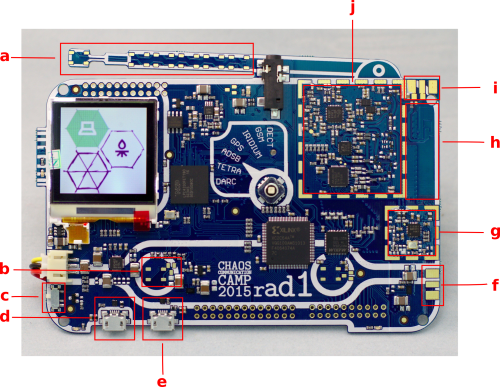
a) No antenna, only deco, pads for additional RGB LEDs (see RGB LEDs)
b) more pads for RGB LEDs (in total there are 3 RGB LED areas, on the part that looks like an antenna, and in the lower left and right area of the board) (see RGB LEDs)
c) On/Off-Switch
d) Micro-USB (A) for connecting to laptop
e) Micro-USB (B) for additional energy (limited to 475 mA)
f) external clock out, an SMA connector (X201) could be soldered here (not for antennas!)
g) clock generator, for sophisticated applications you may want to cover this with a metallic shielding to prevent irradiations (see extension:rfkit)
h) on-board PCB antenna
i) pads for SMA connector (X301) or external antenna. Any edge-launch SMA socket for 1.6mm PCB thickness should work. (see Antennas, note the warnings for soldering!)
j) radio frequency part, for sophisticated applications you may want to cover this with a metallic shielding to prevent irradiations (see extension:rfkit)
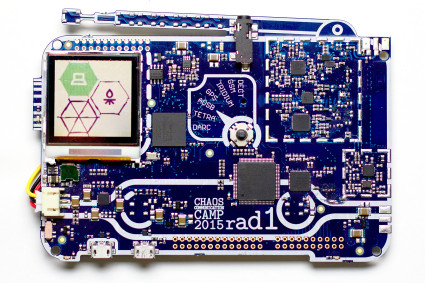
The rad1o badge contains a full-featured SDR (software defined radio) half-duplex transceiver, operating in a frequency range of about 50 MHz - 4000 MHz, and is software compatible to the HackRF.
It is based on a Wimax transceiver which sends I/Q samples in the range of 2.3 to 2.7 GHz to an ARM Cortex M4 CPU. The CPU can process the data standalone for various applications (like FM receiving, spectrogram display, RF controlled power outlets, etc.), or pass the samples to a computer using USB 2.0 where further signal processing can be done e.g. using GNU Radio. Radio signal transmission is also possible in standalone mode by software running on the ARM CPU, or from samples that are sent to rad1o through USB.
The extended frequency range is enabled by a mixer that can be inserted into the RF path. For immediate usage, the board contains a 2.5 GHz PCB antenna. Alternatively, an external antenna can be attached to an SMA connector which can be easily soldered onto the badge by yourself.
The rad1o also provides a Nokia 6100 130×130 pixel LCD and a joystick already known from the r0ket from the last CCCamp 2011.
We also included a 4-pin 3.5 mm audio connector which allows both (mono) headphone and microphone operation with a standard headset.
There are two micro USB ports, both can charge the battery. USB A can be used for software updates and data I/O to SDR software like GnuRadio.
